
 By
By Key Takeaways
- Match the generation to your body, not the hype — the leap chair by Steelcase changed frame durability and weight rating from V1 to V2, and guessing wrong means buying twice.
- Set lumbar firmness before anything else — a Steelcase Leap dialed in wrong loads the lower spine worse than a cheap chair with no lumbar pad at all.
- Check seat depth against your leg length — a seat pan that’s too deep cuts circulation behind the knees long before hour eight of a workday.
- Know what “Leap Plus” actually gets you — the added dimensions and weight rating only matter for a specific body type, and most buyers are overbuying without realizing it.
- Verify a refurbished Steelcase Leap the mechanical way — tilt tension, gas cylinder response, and frame stress points tell you more than any listing photo.
- Choose Leap or Gesture based on how you actually work — reaching across multiple monitors calls for different arm articulation than a single-screen setup ever will.
Search interest in the leap chair by Steelcase has jumped hard over the past year, and it’s not hard to figure out why. Companies shrinking their office footprints are sending chairs home with employees instead of paying to store them. That means a wave of corporate-grade seating is hitting resale channels, home offices, and secondhand listings all at once — and buyers searching for this exact chair name usually already know what they want. They just don’t know which version, which configuration, or whether the pre-owned unit they found online is actually worth the money.
Here’s what most people miss: this isn’t a chair you shop for casually. Twenty years of field assessments have shown one pattern again and again — the difference between a chair that fixes lower back pain and one that makes it worse comes down to a handful of mechanical details most listings never mention. Lumbar firmness settings. Seat depth. Which generation you’re actually buying. Get those wrong, and even a genuinely well-engineered chair will leave your spine worse off than a $150 mesh chair that at least fits your body.
So before anyone clicks buy on a used or refurbished Leap, it’s worth understanding what actually changed across V1, V2, and the so-called V3 listings — and why that matters more than the price tag ever will.
Why Hybrid Work Is Driving New Interest in the Leap Chair by Steelcase
Picture a facilities manager standing in a half-empty office in March, staring at forty chairs nobody’s used in six months. That scene has played out at hundreds of companies downsizing their square footage — and it’s exactly why searches for the leap chair by steelcase have climbed sharply this year. Offices are shrinking. Chairs are going home. And employees who once sat in a shared conference room now need real support for eight-hour days at a kitchen table.
Most people typing that exact phrase into a search bar aren’t browsing. They already know the model, they’ve likely sat in one at a former job, and they’re hunting for a specific listing — new, used, or refurbished — not a general education on ergonomic seating. That’s navigational intent, plain and simple.
Here’s what most buyers get wrong: they treat this like a spec-sheet decision. In practice, after assessing hundreds of home office setups, the difference between a chair that fixes back pain and one that just looks the part comes down to mechanics, not marketing copy. So before comparing V1 to V2 or debating price ranges, it helps to understand what actually happens to your spine when you sit in one for a full workday.
Steelcase Leap V1 vs V2 vs V3: What Actually Changed
Most of what gets called a “V3” online doesn’t exist as a factory designation — Steelcase never officially released a third generation. What resale listings label V3 is usually a late-run V2 with updated fabric or a platinum frame swap. Buyers searching for the real jump in engineering should focus on V1 to V2.
LiveBack Technology Across Generations
The original LiveBack frame on the V1 flexed at set pivot points, which worked but left gaps in lower-back contact during a full workday. The steelcase leap chair v2 refined that flex into a continuous curve that tracks the spine through recline, standing, and forward-lean typing postures. In practice, that means fewer pressure spikes across an 8-hour stretch, especially for anyone who shifts position often. You can browse the steelcase leap chair v2 to see the frame updated with this improved back mechanism.
Weight Capacity and Frame Differences Between V1 and V2
Frame gauge and cylinder rating changed too. V1 units typically top out lower than V2’s standard 300-lb rating, and V2’s reinforced base handles daily recline stress better over a decade of use. Reddit threads debating V1 versus V2 usually miss this part — it’s not nostalgia versus new tech, it’s frame tolerance under real body weight.
How the Leap’s Lumbar and Seat Depth Adjustments Actually Solve Back Pain
Ever wonder why your lower back throbs by 3pm even though the chair looked ergonomic in the showroom? The answer usually comes down to two adjustments most people never touch.
Lower Back Firmness Control Explained
Set the firmness dial too soft and your lumbar spine collapses backward, flattening the natural curve and loading the discs unevenly. Set it too hard and the pad pushes your spine into an exaggerated arch, straining the same muscles it’s supposed to relieve. The Leap’s dial-controlled system lets you dial in resistance without shifting position — something a fixed foam pad in a $250 task chair simply can’t do. Cheaper chairs bolt lumbar support at one height and one density; the spine has to adjust to the chair instead of the other way around. That’s backward, and it’s why so many budget chairs get abandoned within a year.
Seat Depth Adjustment and Circulation
A seat pan that runs too deep presses against the back of the knee, restricting blood flow during an eight-hour stretch — numb feet by lunchtime, tingling ankles by 5pm. The slider should leave two to three finger-widths of clearance behind the knee, adjusted shorter for legs under 30 inches and extended fully for longer frames. Anyone comparing a properly configured steelcase leap ergonomic chair against a rigid seat pan will notice the circulation difference within the first hour.
Steelcase Leap Plus: What Larger and Taller Users Should Know
Here’s a number that surprises most shoppers: the standard leap chair by steelcase tops out around 300 lbs, but roughly 1 in 5 buyers searching for it actually need more room in the seat pan and a higher weight rating. That’s the gap the Leap Plus was built to fill.
Plus Dimensions and Weight Rating vs Standard Leap
The Plus version widens the seat — back by about 2 inches and bumps capacity to 400 lbs, with a reinforced frame and thicker foam. Standard Leap owners over 6’2″ or 230 lbs often find themselves bottoming out the cushion faster than expected — the Plus fixes that without changing the LiveBack mechanics people rely on.
Sorting Out the steelcase leap plus discontinued Question
Search forums are full of confused buyers asking about the steelcase leap plus discontinued status. Steelcase shifted focus toward its current lineup, which means parts sourcing now runs through refurbished inventory and secondary channels rather than fresh factory stock. That’s not a red flag — it’s just how the market matured.
Who Actually Needs the Plus
If you’re under 5’10” and 220 lbs, the standard build fits fine. Plus makes sense for taller frames or anyone who’s felt the seat edge dig in after month two. Getting size right matters more than brand loyalty — it’s part of why a Steelcase Leap office chair can improve posture quickly once it actually fits the body sitting in it.
Steelcase Leap vs Steelcase Gesture: Picking the Right Chair for Your Desk
Here’s a myth that needs killing: the pricier chair isn’t automatically the better chair. A lot of shoppers assume steelcase gesture beats the leap chair by steelcase simply because it costs more and looks more mechanical. That’s backwards. Fit matters more than badge.
Steelcase Gesture with Headrest for Multi-Monitor Work
The Gesture’s arms rotate, lift, and pivot almost like a shoulder joint — built for people reaching across two or three monitors all day. A steelcase gesture with headrest makes sense if you lean back often or work reclined during calls. But if you sit upright and forward most of the day, that headrest just gets in the way.
When the Gesture Outperforms the Leap (And When It Doesn’t)
Realistically, the Gesture wins for broad-shouldered users and anyone doing constant cross-body reaching. The Leap wins for people who want dialed-in lumbar precision and a lower price point on refurbished units. Curious whether either chair actually changes your posture in a measurable way? Research on can a steelcase office chair improve posture within 14 days suggests noticeable shifts happen faster than most people expect — sometimes within two weeks of consistent use. Pick based on your body, not the price tag.
The Refurbished and Pre-Owned Steelcase Market: Separating Fact From Risk
Picture this scenario: a facilities manager finds a Leap listed online for a fraction of retail, meets the seller in a parking lot, and drives home with a chair that squeaks within a month. That’s the risk end of the pre-owned market. On the other end, a professionally certified leap chair by steelcase can perform like new for another decade. The difference comes down to sourcing and inspection — not luck.
What a Certified Refurbished Leap Chair Should Include
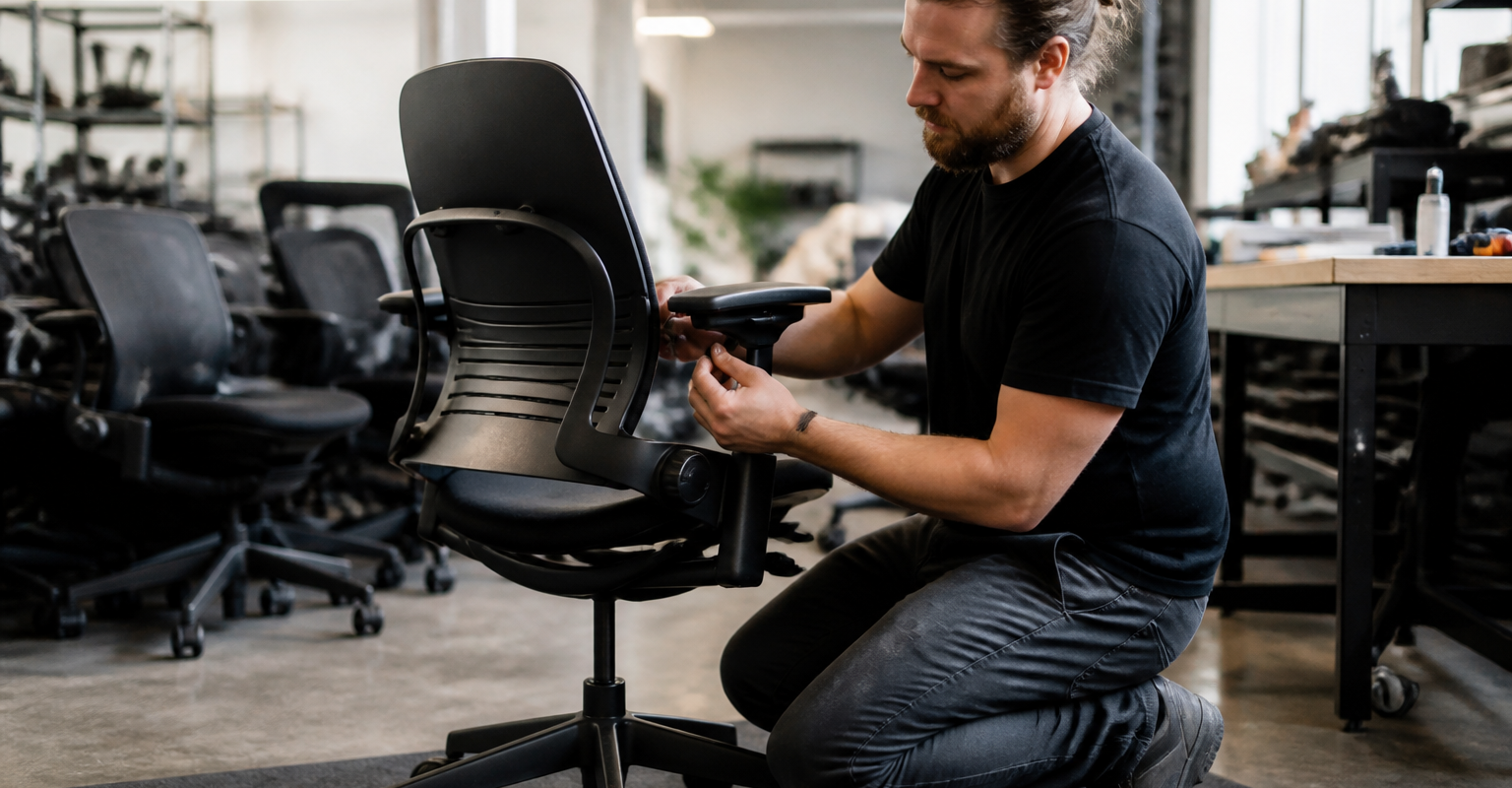
A real inspection checks the tilt tension mechanism under load, tests the gas cylinder for slow leaks, spins the casters for wobble, and flexes the frame at stress points near the seat pan mounts. Corporate upgrade inventory — chairs pulled during office refreshes, not chairs run into the ground — makes this kind of restoration possible. That’s a very different starting point than a worn-out chair sold as-is off a resale app.
Authenticity, Parts, and Warranty Red Flags
Genuine Steelcase mesh has a specific weave and frame stamp; knockoff backs feel thinner and flex wrong under pressure. Before buying pre-owned, ask directly where replacement parts come from and whether coverage extends beyond 90 days. A seller who can’t answer either question in detail probably hasn’t inspected the chair at all. Working through a steelcase leap chair buying checklist before purchase catches most of these issues early.
Mesh, Fabric, and Platinum Finish: Choosing the Right Leap Configuration
Fabric choice matters more than most buyers realize once they’re eight hours into a workday. The 3D knit option stretches with your body and breathes better than standard weave fabric, which tends to trap heat around the lower back by mid-afternoon. Leather looks sharp on a video call but runs warmer than either fabric option — something to weigh if your home office isn’t air conditioned.
Frame color is a smaller decision but it shows up on camera.
Platinum frames read lighter and more modern in a bright room, while black frames disappear into darker backgrounds and photograph better under mixed lighting. Neither affects the mechanics, so this one’s purely aesthetic.
Durability is where the real differences show. Standard fabric wears at the seams first, usually starting around year four or five of daily use. 3D knit holds its shape longer because there’s no separate cushion layer to compress and flatten. Leather cracks eventually, especially near the seat edge where friction is constant.
Budget matters here too. Buyers comparing finishes side by side often start by browsing cheap steelcase chairs (value options) before deciding whether the upgrade to knit or leather actually fits their sitting habits and workspace lighting.
Setting Up Your Steelcase Leap for an 8-Hour Hybrid Workday
How many people actually adjust their chair before sitting down for the first meeting of the day? Almost nobody. And that’s exactly why the leap chair by steelcase gets blamed for back pain it didn’t cause — the hardware was never the problem.
The Adjustment Sequence That Actually Works
Set seat height first — feet flat, knees at roughly 90 degrees. Then pull the seat depth slider so there’s a two-to-three finger gap behind your knees. Next, dial in lumbar firmness using the lower back control until you feel the lumbar support press into the curve, not just touch it. Arms come last — height and pivot, so forearms rest level with the keyboard.
Mistakes That Cancel Out the Engineering
Skipping seat depth is the biggest one. A chair set too deep pushes users forward, flattening the lumbar contact entirely — the LiveBack mechanism can’t do its job if your spine isn’t touching it. Locking recline tension too tight also forces constant muscle bracing instead of the dynamic support the Leap was built to provide.
Warning Signs Within the First Week
Numb thighs mean the seat’s too deep. Lower back ache by 2 p.m. usually means lumbar firmness is too soft. Sore shoulders point to arms set too high. Fix these early — don’t wait a month to notice.
Frequently Asked Questions
What’s the real difference between Steelcase Leap V1 and V2?
The V1 (built roughly 1999 to 2008) uses a simpler back mechanism — doesn’t have the seat depth slider that made the V2 famous. The V2, launched in 2008, added the sliding seat pan, a firmer lumbar adjustment, and a slightly wider back. If you’re comparing steelcase leap v1 vs v2 for daily 8-hour use, the V2 wins on adjustability — but a well-kept V1 still holds up mechanically decades later.
Is the Leap chair by Steelcase still in production, or has it moved to a V3?
Steelcase hasn’t released a formal Leap V3 as of now — the V2 remains the current production model, sometimes updated with new fabric and finish options. Rumors of a V3 pop up occasionally on chair forums, — nothing official has shipped. Anyone searching for a Leap V3 right now is likely finding V2 units with newer upholstery being marketed under that name.
How does the Leap compare to the Steelcase Gesture?
The Leap is built around its LiveBack system, which flexes to track spinal movement as you shift position throughout the day. The Gesture takes a different approach — its arms do more of the work, adjusting through a wider range to support tablets, laptops, and varied hand positions. If your job is mostly typing at a fixed monitor, the Leap generally fits better; if you switch devices constantly, the Gesture (especially steelcase gesture with headrest) earns its keep.
Can you add a headrest to a Leap V1 or a Gesture chair?
Neither the Leap V1 nor V2 ships with a headrest option from the factory — Steelcase designed the LiveBack to support the upper spine without one. The Gesture, on the other hand, offers a factory headrest attachment, and steelcase gesture with headrest configurations are common in corporate upgrade inventory. If neck support is a priority, the Gesture is the better starting point.
Is a refurbished Steelcase Leap or Gesture actually as good as new?
When it’s done right, yes. A properly restored steelcase leap v2 refurbished unit has been stripped down, inspected part by part, and rebuilt with new mechanical components where wear shows — the frame and mechanism underneath are the same engineering Steelcase built for corporate 24/7 use. The honest answer is quality depends entirely on who did the restoration, not on the word “refurbished” itself. Ask what the inspection process actually checks before assuming all refurbished stock is equal.
How much does a Steelcase Leap V2 weigh, and what’s its weight capacity?
A standard Leap V2 weighs around 45 pounds and is rated for up to 300 pounds, with heavy-duty variants rated higher. That weight is mostly in the base and the recline mechanism — it’s a dense chair, not a flimsy one. If you’re over 250 pounds, look for the reinforced tension control rather than the standard build.
Is the Leap Plus discontinued?
Steelcase quietly phased out the standalone Leap Plus, a wider, taller variant built for larger users, in favor of folding that sizing into the standard Leap V2 line with adjustable components. You’ll still find steelcase leap plus used listings floating around from corporate liquidations, and they’re worth grabbing if the size fits you — the seat and back are noticeably roomier than the standard frame.
What finish and fabric options should I expect on a Leap V2?
Steelcase offered the Leap V2 in a handful of frame colors, including a platinum finish that reads lighter and more modern than the standard black frame — steelcase leap v2 platinum units tend to move fast in the resale market because of that look. Fabric-wise, you’ll see 3D knit mesh backs alongside traditional upholstered options in black, gray, and blue. Mesh runs cooler for long sessions; fabric feels warmer but softer against the back.
Is buying a used or refurbished Leap or Gesture worth it compared to buying new?
For most remote workers, yes — the savings are real — the mechanical durability of these chairs doesn’t disappear after one corporate lease cycle. A steelcase leap v2 used or steelcase gesture refurbished unit that’s gone through a proper inspection and part replacement process gets you the same LiveBack or arm mechanism performance new buyers pay full retail for. The only scenario where new makes more sense is if you need a specific brand-new fabric run that hasn’t hit the secondary market yet.
What do people on forums like Reddit actually say about long-term Leap and Gesture ownership?
Search steelcase leap v1 reddit or steelcase gesture reddit threads and you’ll see a consistent pattern — owners report 10, sometimes 15 years of daily use before any mechanism needs attention. Complaints usually trace back to units bought secondhand with no inspection, not the chair design itself. That’s the pattern worth paying attention to: the chair rarely fails first, the seller’s lack of quality control does.
Twenty years of watching office chairs get dragged out of storage closets has taught one thing: the good ones never actually go out of style, they just get forgotten until people need them again. That’s exactly what’s happening with hybrid setups right now. The leap chair by Steelcase earned its reputation because the mechanics work — LiveBack flexing with real spinal movement, seat depth that actually protects circulation instead of choking it behind the knees, lumbar firmness you can dial to your own lower back instead of guessing. Whether someone lands on a V1 for its frame durability, a V2 for updated materials, or a Plus for a bigger seat pan, the choice should come down to body size and how long they’re sitting each day — not resale hype or a color that matches the video call background. A properly inspected, certified refurbished Leap gets a home office 90% of the way to new-chair performance for a fraction of the outlay. Before buying used, ask about the certification process, the warranty terms, and whether replacement parts are genuine Steelcase. That question alone separates a smart purchase from a regret.
For more, check out What highest rated seo companies do after rankings start turning into leads.